If you want a bot to trade AURORA signals, what does it need to receive, and what must it handle itself?
After this lesson you will
- Tell setup alerts (manual) apart from JSON alerts (automated)
- Know AURORA's JSON events and when each is sent
- Know what a bot must do itself: de-duplicate, place SL / TP on the exchange, track the position
What kinds of alert does AURORA have?
1. Setup alerts, for manual trading. You pick a built-in condition and TradingView notifies you when it happens. The alerts shared by AURORA Standard and Pro:
AURORA 1st BREAK BUY setup/SELL setupAURORA 2nd BREAK BUY setup/SELL setupAURORA SUNNY BUY setup/SELL setupAURORA PULLBACK LIMIT placedAURORA HIGHLIGHT BUY/SELL
AURORA Pro adds AURORA SMC BUY setup / SELL setup. The alerts for Smart signals by grade A / B and for exit hints are named slightly differently in the two editions: check the list in the alert dialog. These alerts fire only when a trade is actually entered.
2. JSON alerts, for bots. You create one alert with the “Any alert() function call” condition. Whenever an event occurs, AURORA sends a structured JSON packet. If you add a webhook URL, TradingView forwards it to your server or bot service.
Why does a bot need JSON rather than a line of text?
- Structured data. The bot reads the entry, F-SL, TP1, TP2, direction and setup name directly, instead of parsing a sentence.
- De-duplication. A slow network or a TradingView retry can deliver a message twice. The
signal_idlets the bot ignore messages it has already processed. - Versioning. The
versionfield tells the bot which indicator release sent the message, so it does not misread a changed structure.
Common misunderstandings
- An alert means a filled order. An alert is only a notification. Whether and at what price an order fills is up to the exchange.
- The JSON reports everything. AURORA sends nothing when price hits TP1, TP2 or the stop. The bot must place those orders on the exchange as soon as the trade opens.
- Create an alert once and it works forever. A TradingView alert stores the indicator version and settings at creation. After an update or a settings change, delete and recreate it.
- The “1st BREAK” setup alert always fires on a 1st BREAK. If the BREAK candle is overly long and switches to Pullback Entry, the alert that fires is
PULLBACK LIMIT placed, not the 1st BREAK alert.
Chart example
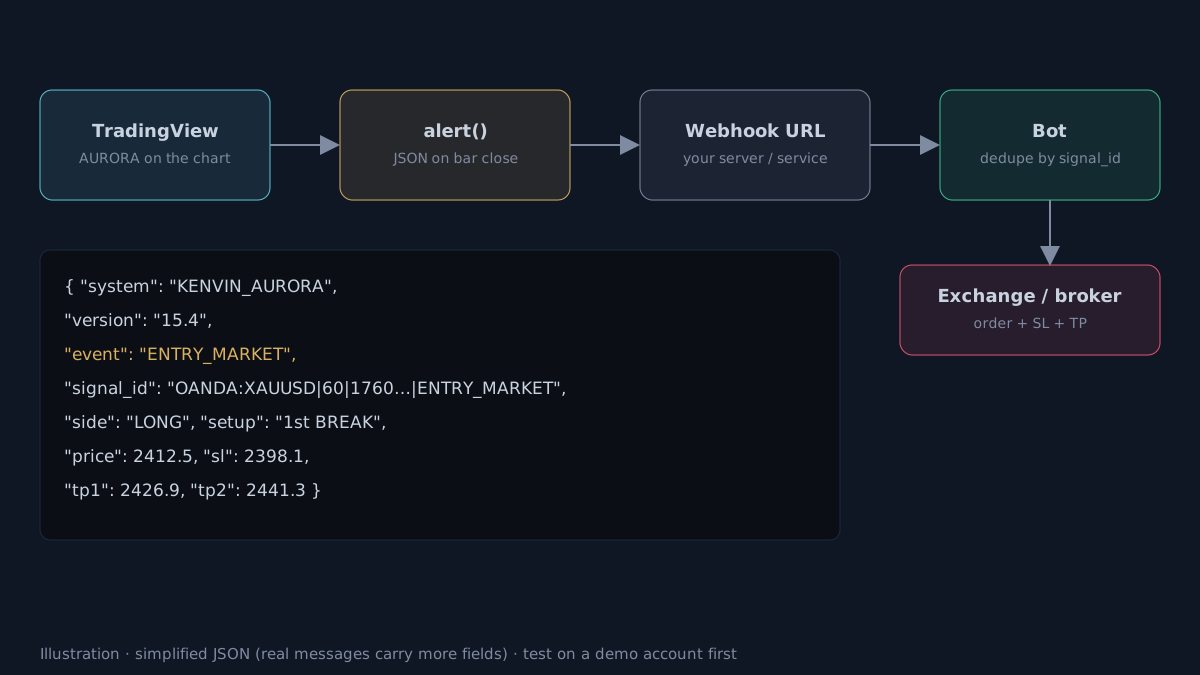 Illustrative diagram. Real JSON packets carry more fields.
AURORA’s JSON events
Every packet shares a header: system, version, event, signal_id, tickerid, ticker, tf, bar_time. The current versions are 12.2-PROD-RC1 (Standard) and 15.4 (Pro).
| Event | When | Main fields |
|---|---|---|
ENTRY_MARKET |
Entry at the candle close | side, setup, grade, score, price, sl, tp1, tp2, share closed at each TP |
PLACE_LIMIT |
A Pullback limit order is placed | order_id, side, limit, sl, valid_bars |
CANCEL_LIMIT |
The limit order is cancelled | order_id, reason: timeout, runaway, trend flip, opposite signal, another position opened |
ADD_POSITION |
A same-direction signal while a trade is open | side, score, price |
CLOSE_POSITION |
Closed by trade management | reason: EXIT, TIME, REV, NEXT · price, r |
AURORA Pro adds RUNNER_ACTIVATED, UPDATE_STOP and RUNNER_EXIT for the Runner, plus quality fields such as setup_quality and tier3_quality.
Operating notes:
- JSON packets are sent only once the candle has closed. If several events happen on the same candle (for example closing an old trade and opening a reversal), all of them are sent.
- A limit order filling on the exchange creates no new event: the bot placed it from
PLACE_LIMITand the exchange fills it.
Creating a JSON alert on TradingView:
- Open Create alert; under Condition choose the AURORA indicator → Any alert() function call.
- Under Notifications, enable Webhook URL and paste your bot’s address.
- Give it a clear name, for example
AURORA XAUUSD H1 BOT.
Under TradingView’s current rules, webhooks usually require a paid plan and two-factor authentication. Each alert is tied to one symbol and timeframe, so create one per chart.
What the bot must handle itself
- De-duplication. Store processed
signal_idandorder_idvalues and ignore repeats. - SL / TP on the exchange. As soon as the trade opens, place the stop and the take-profit orders using the shares in the JSON. If the minimum size cannot be split, use a single full exit.
- Real state comes from the exchange. Position, fill price and balance must be read from the exchange, not inferred from alerts.
- Latency and slippage. There is a delay between the candle close and the order reaching the exchange; the fill can differ from the JSON price.
- Test on demo first. Run long enough on a demo account, compare with the Strategy Validator, then go live with small size.
Practical checklist
- Manual trading: create alerts by setup name. Bots: create one 'Any alert() function call' alert.
- The bot must store signal_id and order_id to ignore duplicates.
- Place SL and TP on the exchange as soon as the trade opens; AURORA sends nothing when TP or SL is hit.
- Recreate every alert after updating the indicator version.
- Test on a demo account before using real money.
Video Explainer
The video for this article is in production. The full written lesson is already complete.
Video chapters
- What a bot needs to receive
- Two kinds of alert
- The JSON events
- Creating a webhook alert on TradingView
- What the bot must handle itself
Show transcript
Product documentation
Educational and decision-support content, not investment advice. Chart examples are illustrative or historical and do not guarantee future results. Trading carries a risk of capital loss.