Closing everything at 2R feels safe, but every time price runs on to 5R or 8R you regret it: is there a balance?
After this lesson you will
- Calculate the R result of a 50 / 25 / 25 plan in different scenarios
- Know how far the Runner must travel before it beats a 50 / 50 exit
- Know AURORA Pro's three Runner modes and how to measure the Runner's value
What is the Runner?
AURORA’s standard trade plan closes 50% at TP1 (1R) and 50% at TP2 (2R). A plan with a Runner splits it differently:
- 50% closes at TP1.
- 25% closes at TP2.
- 25% is kept as the Runner. After TP2, its stop is locked at the TP1 level, then trails the Trailing line, only in the favourable direction.
The Runner ends when it hits its trailing stop, or on an Adaptive-mode exit: a Trailing flip, the holding-time limit, or an opposite signal.
When does the Runner help?
Results in R, assuming the trade has already hit TP1 and TP2:
| Runner exits at | With Runner (50 / 25 / 25) | Without Runner (50 / 50) |
|---|---|---|
| The TP1 lock (+1R) | 0.5 + 0.5 + 0.25 × 1 = +1.25R | +1.5R |
| +2R | 0.5 + 0.5 + 0.25 × 2 = +1.5R | +1.5R |
| +3R | +1.75R | +1.5R |
| +5R | +2.25R | +1.5R |
| +8R | +3.0R | +1.5R |
The key point: the Runner only beats a 50 / 50 exit when the remaining part exits beyond 2R. If the market usually pulls back right after TP2, the Runner makes results slightly worse on many trades.
Before TP2 the two plans are identical: TP1 then back to the stop gives 0R (stop kept), the stop before TP1 gives −1R.
Common misunderstandings
- A Runner always adds profit. No. It trades part of the certain profit at TP2 for the chance of a long run.
- A Runner cannot lose. The Runner part is locked in profit, but the whole trade can still end below the 50 / 50 plan.
- Every market suits a Runner. Runners suit markets with persistent trends; markets that reverse quickly stop Runners out early.
- Small sizes work too. A 50 / 25 / 25 split needs a size that can be divided into four parts.
Chart example
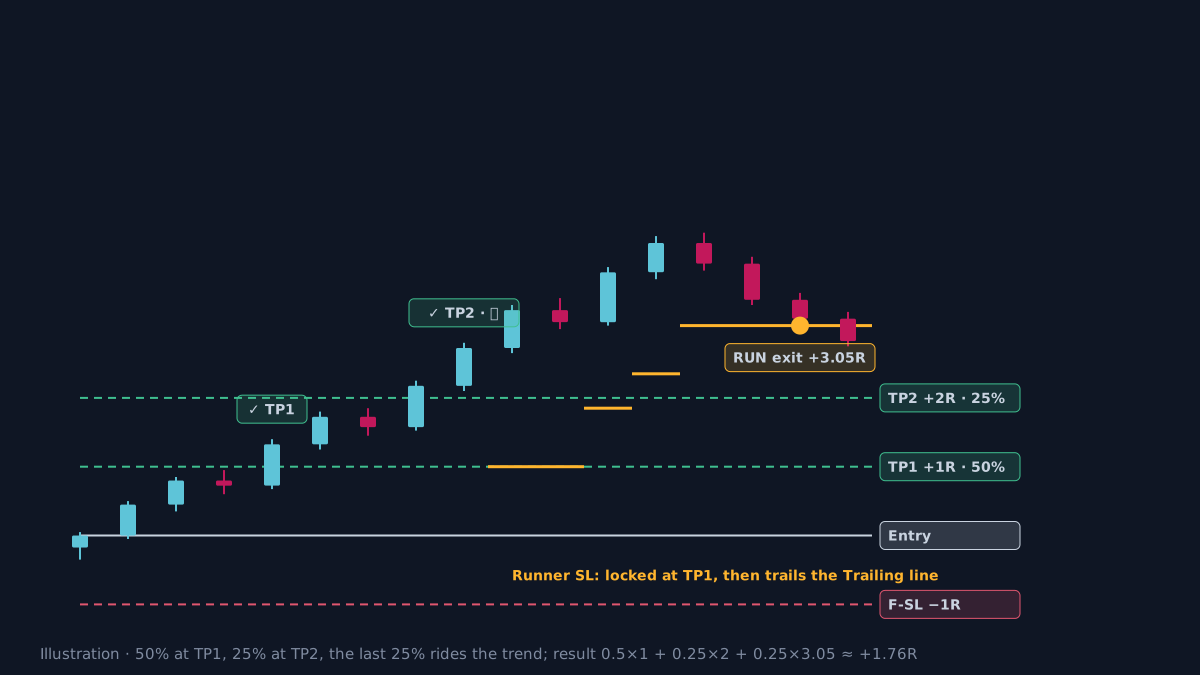 Illustration, not real market data.
Entry at 101.2 with 1R = 4. After TP2, the Runner’s stop locks at TP1 (105.2) and is then pulled up along the Trailing line. The Runner exits at 113.4, or +3.05R. The whole trade: 0.5 × 1 + 0.25 × 2 + 0.25 × 3.05 ≈ +1.76R, versus +1.5R with a 50 / 50 exit.
How does AURORA Pro use the Runner?
- Three modes (the Runner sau TP2 box, Tier 3 group):
- Off (default): 50% TP1, 50% TP2.
- Always 25%: every setup trade keeps a Runner.
- Tier3 adaptive 25%: keeps the Runner only when the Runner suitability score at entry is 70 or more. This score measures path efficiency, trend strength, higher-timeframe agreement and AVWAP location.
- Trading Style: Swing switches on Adaptive mode automatically; the other styles turn the Runner off.
- On the chart:
- At TP2 the label becomes
✓ TP2 · 🚀 RUNNER. - The stop label becomes
🚀 Runner SL. - On close, the result label shows
🚀 RUN.
- At TP2 the label becomes
- Dashboard:
- A
🚀 Runnerrow shows trades that reached TP2 with a Runner, their total R and average R. - The Exits row shows
TP2/RUN.
- A
- JSON alerts for bots:
ENTRY_MARKETcarriesrunner_plannedand the split (tp2_pct25,runner_pct25).- After TP2 comes
RUNNER_ACTIVATED; each stop move sendsUPDATE_STOP; the end sendsRUNNER_EXIT.
- The Strategy Validator places all three 50 / 25 / 25 orders as soon as the trade opens; trade names add
RUN.
Measuring the Runner
- Compare on the same data: run the Strategy Validator once with the Runner off and once with Adaptive or Always, keeping every other setting the same. Compare average R, drawdown and Profit Factor.
- Look at the distribution, not just the average. The Runner’s benefit comes from a few trades that run very far; it takes time and enough trades to see it.
- Trading costs: splitting orders can raise commission with some brokers.
- Better on higher timeframes. Trends on H4–D1 usually have time for a Runner to pay off; very low timeframes stop it out early. Historical results, before costs.
Practical checklist
- Decide before entry whether this trade keeps a Runner.
- After TP2, lock the Runner's stop in profit and only trail it in the favourable direction.
- Remember the Runner beats a 50 / 50 exit only when it exits beyond 2R.
- Do not use a Runner when the minimum size cannot be split into four parts.
- Compare the 🚀 Runner row with results with the Runner off, on the same data.
Video Explainer
The video for this article is in production. The full written lesson is already complete.
Video chapters
- Closing at 2R and regretting it
- The 50 / 25 / 25 split
- When the Runner helps
- The three Runner modes in AURORA Pro
- Measuring the Runner
Show transcript
Product documentation
Educational and decision-support content, not investment advice. Chart examples are illustrative or historical and do not guarantee future results. Trading carries a risk of capital loss.