Why can the same setup perform so differently at 3 pm and at 3 am?
After this lesson you will
- Know the main session hours and how they shift with daylight saving time
- Understand why liquidity and volatility change by session
- Know AURORA's four Session modes and when to use each
What are trading sessions?
Forex, gold and index markets run almost 24 hours, but activity is not even. Money concentrates around the working hours of three major financial centres:
- Asia session: Tokyo, Singapore, Hong Kong.
- London session: Europe.
- New York session: the United States.
The window when London and New York are both open usually has the highest liquidity and volatility. The transitions, when one session has closed and the next has not opened, are usually thinner.
AURORA’s default session windows, in local exchange time and in UTC:
| Session | Local time | UTC, European / US summer | UTC, winter |
|---|---|---|---|
| Asia | 09:00–15:00 Tokyo | 00:00–06:00 | 00:00–06:00 |
| London | 08:00–16:30 London | 07:00–15:30 | 08:00–16:30 |
| New York | 08:00–17:00 New York | 12:00–21:00 | 13:00–22:00 |
| London–NY overlap | 12:00–15:30 | 13:00–16:30 |
Europe and the US change clocks on different dates, so for a few weeks each year the gap shifts by an extra hour.
Why do sessions affect signals?
- Liquidity. Busy sessions have tighter spreads and better fills; in quiet hours a single large order can move price.
- Volatility. Breakouts during London or New York tend to follow through more than breakouts in the middle of the night.
- News. Major US and European economic releases land at the start of these sessions.
- Relative volume. Evening volume is always higher than midday volume in Asia; volume should be compared with the same time of day, not with the daily average.
Common misunderstandings
- Session hours are fixed on the clock. In local time zones outside Europe and the US, London and New York shift by an hour between summer and winter.
- London is always the best session. It depends on the symbol: gold, US indices and Asian currency pairs each have different “good” hours.
- Crypto follows sessions like forex. Crypto trades continuously and is less clearly session-driven.
- Filtering out a bad session after a few trades. Small samples mislead; filtering on short history is a form of overfitting.
Chart example
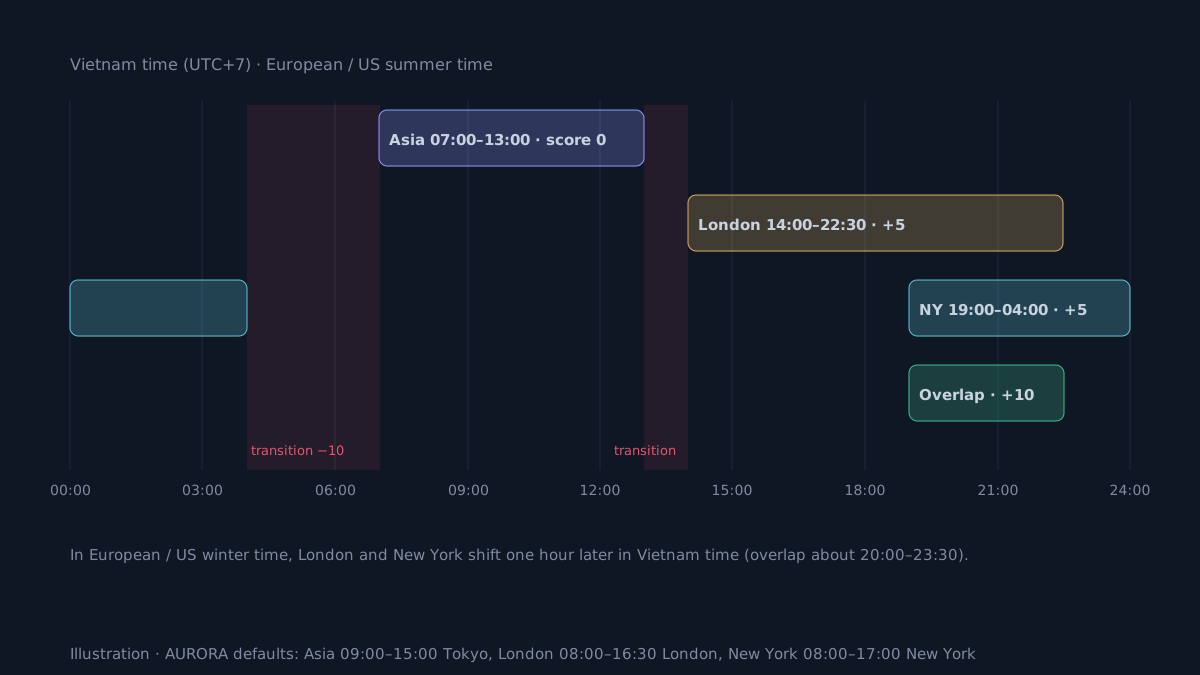 Illustration of the default windows in Vietnam time (UTC+7) during European / US summer time, with the Score mode points.
How does AURORA use sessions?
AURORA defines each session in the time zone of its financial centre (Tokyo, London, New York), so daylight saving is handled automatically. Sessions apply only to intraday charts.
The four modes of the Session mode box:
| Mode | Effect |
|---|---|
| Off | Sessions are not used. |
| Stats only | Records trade results by entry session; signals are unchanged. |
| Score | Adds / subtracts points: London–NY +10, London +5, New York +5, Asia 0, transition −10. |
| Filter | Blocks signals in chosen sessions; by default it blocks transitions. |
Defaults by market:
- AURORA Standard V12.2: FOREX uses Score, CFD and CRYPTO use Stats only, STOCK is off.
- AURORA Pro V15.4: the Session mode box defaults to Auto (by Market Preset), with the same result. You can pick a specific mode to override it under any preset, for example Filter for a funded account.
Display:
- The dashboard (when not in Mini layout) has one row per session: trade count, win rate, total R and average R. A ● marks the current session.
- The signal label tooltip names the session at entry.
- Setups blocked by session show a ⛔ label with the session as the reason.
Do not over-filter
- Enough trades before filtering. Each session needs enough trades. Let Stats only run long enough, and recheck on a different period.
- A session is a proxy, not a cause. Poor results in one session may come from news or a particular market phase.
- Holidays and special hours. Holiday liquidity is very different from a normal day in the same hours.
- Blocking sessions cuts trade count. Compare average R, total R and drawdown before keeping a filter. Historical results, before costs.
Practical checklist
- Know the current session by the exchange's time, not a fixed clock time.
- Record the session at entry so you can review results by session.
- Be careful with breakouts during session transitions, when liquidity is thin.
- Filter sessions only when per-session statistics have enough trades and a clear difference.
- Check the news calendar: major releases often land at the start of London or New York.
Video Explainer
The video for this article is in production. The full written lesson is already complete.
Video chapters
- 3 pm versus 3 am
- Three sessions and their hours
- Why sessions matter
- AURORA's four Session modes
- Do not over-filter
Show transcript
Product documentation
Educational and decision-support content, not investment advice. Chart examples are illustrative or historical and do not guarantee future results. Trading carries a risk of capital loss.