The question
A buy signal appeared mid-candle and vanished a few minutes later: what happened?
After this lesson you will
- Understand why a mid-candle signal can disappear at the close
- Tell repainting apart from confirmation lag
- Know how AURORA handles signals, alerts and higher-timeframe data
What is bar-close confirmation?
While a candle is live, its close does not exist yet: the current price keeps changing. Every indicator calculated from the close changes with it.
Bar-close confirmation means treating a signal as real only once the candle has finished. The data is then fixed, and the signal no longer changes.
Why does it matter?
- Mid-candle signals can disappear. Price crosses the trigger for a few minutes and comes back; if you entered, you are holding a trade without a signal.
- Past charts deceive. On a historical chart every candle has closed, so you never see the signals that appeared and then vanished.
- Higher-timeframe data can “see the future”. If an indicator uses an unfinished H4 candle while calculating on M15, past results use information nobody had at the time.
How do repainting and lag differ?
- Repainting: signals or values on past bars change after they appeared. This is serious, because past statistics no longer reflect what a trader saw at the time.
- Confirmation lag: the signal appears later but does not change afterwards. For example, swing highs and lows need a few bars to be confirmed. This is a reasonable trade-off, not a flaw.
Common misunderstandings
- A “never repaints” indicator is automatically good. No absolute promise replaces checking for yourself: watch the signals in real time and compare them with the historical chart.
- Entering mid-candle is always better because it is earlier. Earlier, but with extra false signals that vanish at the close.
- Intrabar alerts are the same as bar-close alerts. Intrabar alerts can report signals that never end up existing.
Chart example
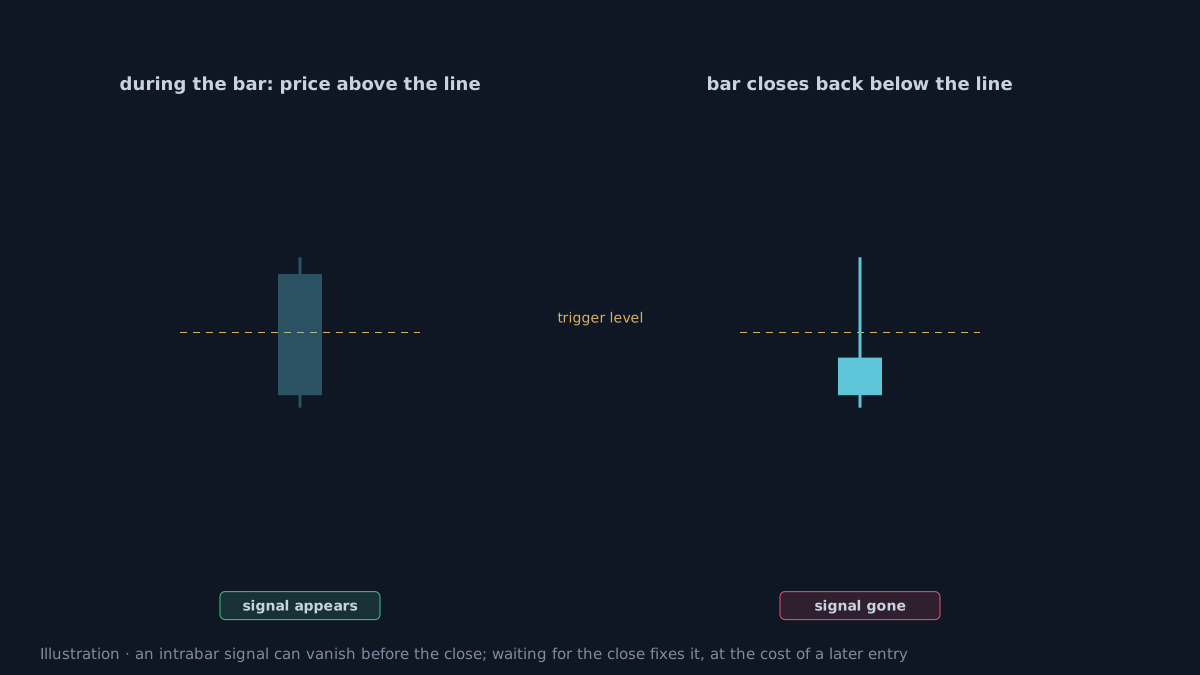 Illustration.
How does AURORA handle it?
- Signals confirm on bar close by default. The Confirm signals on bar close box is on by default for Smart signals; BREAK, SUNNY and SMC setups also appear only once the candle has closed.
- Higher-timeframe context uses closed higher-timeframe bars. The multi-timeframe agreement reads the previous, finished higher-timeframe candle.
- JSON alerts are sent only once the candle has closed.
- Deliberate lag: the Trailing line and SMC setups use pivot highs and lows that need a few bars to confirm. Signals arrive later but are not redrawn.
- RVOL~ on the dashboard is a projection for the live candle, marked with
~so it is not mistaken for the final value.
The cost of waiting for the close
- Later entries. With a long candle, the close can be far from the breakout point; this is why AURORA has Pullback Entry.
- The timeframe sets the delay. Waiting for an H4 close can take up to four hours; on low timeframes the delay is short.
- You still need to verify. Watching an indicator in real time for a while and comparing it with backtest results is the best way to trust any tool.
Practical checklist
- Act on signals only after the candle closes, unless your strategy is validated for intrabar entries.
- Set alerts to fire on bar close.
- When using higher-timeframe data, make sure only closed higher-timeframe bars are used.
- Test an indicator by watching its signals in real time, not only on past charts.
- Accept a slightly later entry in exchange for signals that do not change.
Video Explainer
The video for this article is in production. The full written lesson is already complete.
Video chapters
- A signal appears, then vanishes
- Live candles and closed candles
- Repainting and seeing the future
- How AURORA handles it
- The cost of waiting
Show transcript
A buy signal appeared mid-candle and vanished a few minutes later. The signal's condition was only temporarily true while the candle was live; by the close, price had pulled back.
That is why many systems confirm signals only once the candle has closed. The signal then stays fixed, at the cost of a slightly later entry.
Higher-timeframe data is a second issue. If an indicator uses the value of an unfinished higher-timeframe candle, its historical results can look better than reality, because it unknowingly uses information from the future.
In AURORA, signals confirm on bar close by default, and higher-timeframe context uses closed higher-timeframe bars.
Product documentation
Educational and decision-support content, not investment advice. Chart examples are illustrative or historical and do not guarantee future results. Trading carries a risk of capital loss.