The question
Why should switching your trading style to Scalping not quietly cut your trade count in half?
After this lesson you will
- Tell entry filters apart from trade-management rules
- Know how Core parity, Balanced and Strict differ
- Know how to compare profiles before choosing one
What is the Entry Filter Profile?
A trading system makes two very different kinds of decision:
- Entry filters: which setups qualify? For example a minimum score or a maximum stop distance.
- Trade management: once in, how long to hold, whether to move to breakeven, how to take profit?
The Entry Filter Profile is the AURORA Pro setting that handles only the first:
| Profile | Minimum score (BREAK, SUNNY, SMC) | Max Break stop | Use when |
|---|---|---|---|
| Core parity (default) | 50 | No limit | You want a setup count close to AURORA Standard, as a baseline |
| Balanced | 55 | 4 ATR | You want fewer low-score setups and fewer very wide stops |
| Strict | 60 | 3 ATR | Funded accounts; fewer but more selective trades |
| Custom | Uses the minimum-score and max-stop boxes in each setup group | The data gives you a specific reason |
Why separate filters from trade management?
- Know what changed. If changing the management style also changes the setup count, you cannot tell whether results moved because of management or because the trades themselves changed.
- Make comparisons possible. With the same set of setups, you can test Scalping against Swing on the same trades and see which management works better.
- No hidden effects. In V15.2, choosing the Prop Firm Trading Style quietly raised the minimum score, capped the stop and switched on a session filter. V15.4 removes these hidden effects entirely.
Common misunderstandings
- Strict is always better. Stricter means fewer trades; the win rate may rise, but average R and total profit may not.
- Core parity is “loose”. Core parity still requires a score of 50 and every setup condition; it simply adds no stop limit for Break.
- Choosing Prop Firm is enough for safety. The Prop Firm Trading Style only moves the stop to breakeven after TP1. For more selectivity, also choose the Strict Entry Filter Profile and consider Session mode Filter.
- The max stop applies to every setup. The profile’s stop limit applies to Break only. SMC has its own structural stop policy (a
⚠SLwarning when wider than 4 ATR).
Chart example
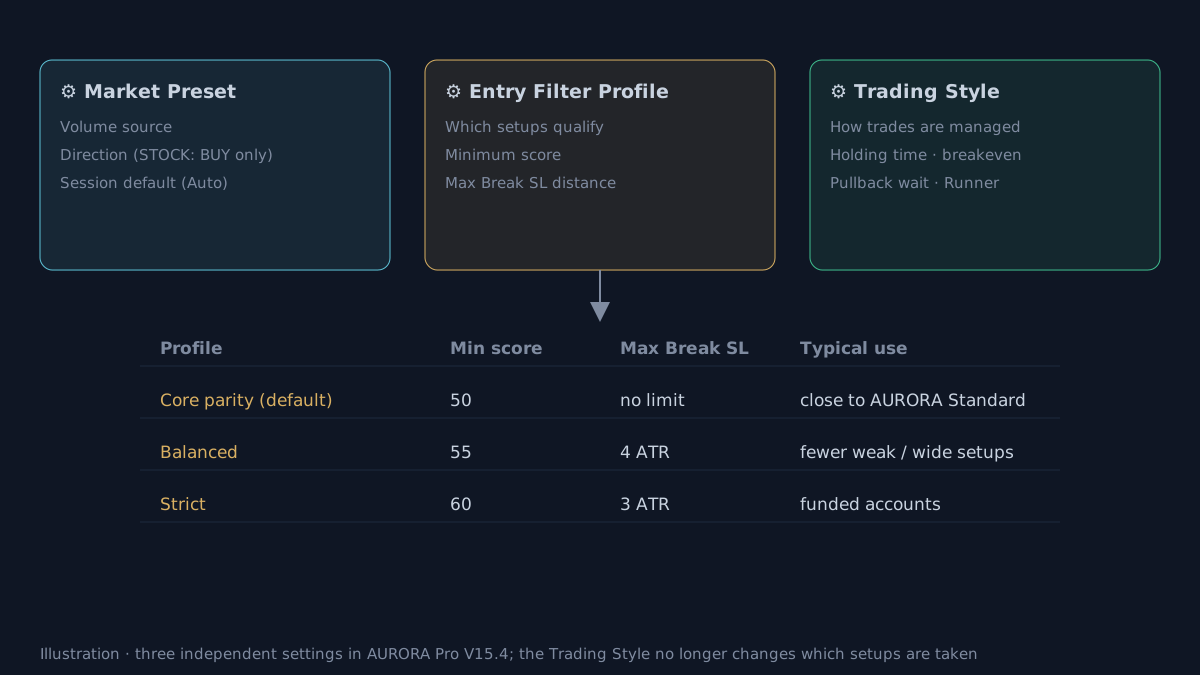 Illustrative diagram.
How does AURORA Pro use the Entry Filter Profile?
- Three independent boxes at the top of the AURORA MODE group:
- Market Preset: volume source, trade direction, default session.
- Trading Style: how trades are held and exited.
- Entry Filter Profile: which setups qualify.
- The Trading Style now only manages trades:
| Scalping | Intraday | Swing | Prop Firm | |
|---|---|---|---|---|
| Maximum holding | 60 bars | 120 bars | 200 bars | 120 bars |
| Breakeven after TP1 | Yes | No | No | Yes |
| Pullback wait | 4 bars | 6 bars | 3 bars | 6 bars |
| Runner | Off | Off | Adaptive 25% | Off |
- Display: the dashboard title shows the active profile (Core, Balanced, Strict, Custom entry). Blocked setups show
⛔with the reason, for example “Score 52 < 55”. - Overrides: when the profile is not Custom, the minimum-score and max-stop boxes inside each setup group are ignored.
- Suggestion for funded accounts: Trading Style Prop Firm + Entry Filter Profile Strict + Session mode Filter.
Without AURORA the principle still applies: write down which rules are entry conditions and which are management rules, and change only one group at a time.
Choosing a profile with data
- Run the Strategy Validator three times on the same symbol and timeframe, changing only the Entry Filter Profile. Compare average R, maximum drawdown, Profit Factor and trade count.
- Check the ⛔ Filtered row with Balanced or Strict: if blocked trades have negative average R, the stricter profile is removing weaker trades.
- Check out-of-sample. The best profile on one period may not be the best on another.
- Enough trades to decide. Strict produces fewer trades; small differences over few trades may be chance. Historical results, before costs.
Practical checklist
- Start with Core parity as a baseline close to AURORA Standard.
- Change one box at a time: Market Preset, Trading Style or Entry Filter Profile.
- Compare profiles by average R, drawdown and trade count, not only win rate.
- Check the ⛔ Filtered row to see whether a stricter profile blocks weak or good trades.
- Use Custom only when the data gives you a specific reason.
Video Explainer
The video for this article is in production. The full written lesson is already complete.
Video chapters
- Change style, lose half the trades
- Entry filters vs trade management
- Core parity, Balanced, Strict
- Three independent boxes in AURORA Pro
- Choosing a profile with data
Show transcript
Before V15.4, switching the trading style to Scalping or Prop Firm did not just change trade management; it also quietly changed the minimum score, the maximum stop and the session filter. The setup count changed and users could not tell why.
From V15.4 these are separated. The Trading Style only decides how long trades are held, whether the stop moves to breakeven, how long a Pullback order waits and whether a Runner is kept. The Entry Filter Profile decides which setups qualify.
There are three profiles: Core parity, with a minimum score of 50 and no stop limit, close to AURORA Standard; Balanced, with 55 points and at most 4 ATR; and Strict, with 60 points and at most 3 ATR.
Do not pick a profile by feel. Compare them in the Strategy Validator, on the same symbol and timeframe, changing only that one box.
Product documentation
Educational and decision-support content, not investment advice. Chart examples are illustrative or historical and do not guarantee future results. Trading carries a risk of capital loss.